
Kruti dev 010 Font Download Hindi Free | Kruti Dev 010 TTF File for Windows, Mac & Android
Download the KrutiDev font for free right here. No sign-up needed. No hidden cost. Just click and download. The file is 100% safe. It is the original Kruti Dev 010 TTF file.
What is KrutiDev Font?
KrutiDev font is a Hindi typing font. It is the most popular Hindi font in India. Millions of people use KrutiDev daily. Government offices use it for Hindi documents. Courts use it for case files. Banks use it for Hindi records. Schools use it for Hindi content.
KrutiDev is a non-Unicode font. It uses English letters to show Hindi text. Your computer needs the font installed. Without it, Hindi text shows as random English letters. After the KrutiDev font, the Hindi text shows correctly.
KrutiDev was made before Unicode existed. That is why it is called a legacy font. But it is still very widely used today. Many typing exams in India use the KrutiDev font.
Kruti dev 010 Font Download Details
Here are the details of this font file.
- Font Name: Kruti Dev 010
- File Type: TTF (TrueType Font)
- File Size: 92 KB
- Language: Hindi (Devanagari Script)
- Keyboard Layout: Remington (Typewriter Layout)
- License: Free for personal use
- Works On: Windows, Mac, Android, Linux
How to Download KrutiDev Font
KrutiDev font download is very simple. Follow these steps.
Step 1: Click the Download button above. The TTF file will start downloading. It saves to your Downloads folder. The file name is krutidev-010-hindi-font-download.ttf.
Step 2: Find the file in your Downloads folder. It is a small file. It downloads in seconds. Now you are ready to install it.
That is all for downloading. Now let us install it.
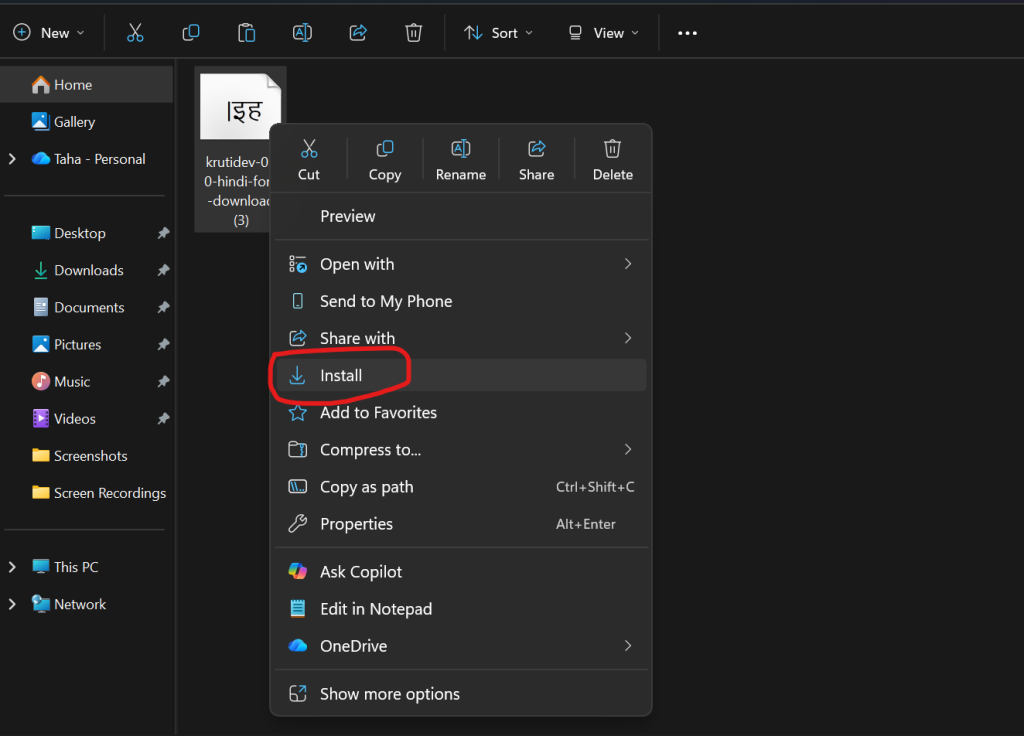
How to Install KrutiDev Font on Windows
Windows is the most common system for KrutiDev. Installation is very easy here.
Method 1 – Double-Click Install (Easiest)
- Step 1: Go to your Downloads folder. Find the KrutiDev TTF file. Double-click on it. A font preview window opens. You will see Hindi sample text at the top.
- Step 2: Click the Install button at the top. Windows installs the font. It takes 2 seconds. A confirmation appears when done.
- Step 3: Restart your MS Word or any app. Go to the font list. Search for Kruti Dev 010. Select it and start typing in Hindi.
Method 2 – Right-Click Install
- Step 1: Go to your Downloads folder. Find the KrutiDev TTF file. Right-click on the file.
- Step 2: A menu appears. Click Install. Or click Install for all users. The font installs immediately.
- Step 3: Open MS Word. Select Kruti Dev 010 from the font list. You are ready to type.
Method 3 – Copy to Fonts Folder
- Step 1: Open File Explorer. Go to C:\Windows\Fonts. This is the Windows fonts folder.
- Step 2: Copy the KrutiDev TTF file. Paste it into the Fonts folder. Windows installs it automatically.
- Step 3: Open any text editor. Select Kruti Dev 010. Start typing in Hindi.
How to Install KrutiDev Font on Mac
Mac users can also use KrutiDev font. Follow these simple steps.
- Step 1: Download the KrutiDev font TTF file. Save it to your Downloads folder.
- Step 2: Double click the TTF file. Font Book app opens on your Mac. You will see a preview of the font.
- Step 3: Click Install Font button. Mac installs it in seconds. The font is now ready to use.
- Step 4: Open any app like Pages or Word for Mac. Go to font selection. Search for Kruti Dev 010. Select it and start typing.
How to Install KrutiDev Font on Android
Android installation needs a few extra steps. But it is still easy.
You Need WPS Office App
Android does not support system-wide custom fonts easily. But WPS Office app supports KrutiDev font. WPS Office is free on Play Store.
- Step 1: Download WPS Office from Google Play Store. Install it on your phone.
- Step 2: Download the KrutiDev TTF font file on your phone. It saves in your Downloads folder.
- Step 3: Open your File Manager app. Go to Internal Storage. Find or create a folder called Fonts.
- Step 4: Copy the KrutiDev TTF file. Paste it into the Fonts folder in Internal Storage.
- Step 5: Open WPS Office. Create a new document. Go to font selection. You will see Kruti Dev 010 in the list. Select it and type in Hindi.
How to Install KrutiDev Font on Windows 11
Windows 11 installation is same as Windows 10. It is very simple.
- Step 1: Download the KrutiDev font file. Go to Downloads folder. Right click on TTF file.
- Step 2: Click Show more options. Then click Install. Or click Install for all users.
- Step 3: Font installs in 2 seconds. Open MS Word. Select Kruti Dev 010. Start typing.
- Windows 11 also supports double click install. That method works too. Both methods are fast and easy.
How to Use KrutiDev Font After Install
After KrutiDev font, using it is simple.
- In MS Word: Open MS Word. Click the font name box at the top. Type Kruti Dev 010. Press Enter. Now type using the KrutiDev keyboard layout.
- In Notepad: Open Notepad. Click the Format menu. Click Font. Search for Kruti Dev 010. Select it. Click OK. Start typing.
- In Photoshop: Open Photoshop. Select the Text tool. Go to font selection. Search Kruti Dev 010. Select it. Type your Hindi text.
- In Pagemaker: Open Pagemaker. Create a text box. Select Kruti Dev 010 from the font list. Type your content.
KrutiDev Keyboard Layout
KrutiDev uses the Remington keyboard layout. This is the old typewriter layout. It is different from normal English typing. Here are some common keys.
- k key = ा (aa matra)
- d key = क (ka)
- f key = ि (i matra)
- j key = र (ra)
- g key = ह (ha)
- l key = स (sa)
This layout takes a little practice. But once you learn it, typing is very fast. Most government typists know this layout well.
Why You Need KrutiDev Font Download
There are many reasons to download the KrutiDev font.
- For Government Jobs SSC typing test uses KrutiDev. High Court typing exams use KrutiDev. State government exams use KrutiDev. You must have the font to practice.
- For Office Work Many offices still use KrutiDev documents. You need the font to open and read them. Without it, you only see random letters.
- For Hindi Typing Practice, KrutiDev is the standard for Hindi typing courses. All typing tutors teach the KrutiDev layout. Download the font to start practicing.
- For Old Documents You may have old Hindi files in KrutiDev format. Install the font to read them correctly. Then you can convert them to Unicode if needed.
- For Printing Work Print shops and press agencies use KrutiDev. Posters, banners, and pamphlets are made with it. Designers need the KrutiDev font for Hindi print work.
KrutiDev Font is Not Showing Hindi – Fix It
Sometimes, after installation, KrutiDev still shows English letters. Here is how to fix it.
- Problem 1: Font Not Selected. You installed the font but did not select it. Go to your app. Select Kruti Dev 010 from the font list. Now the text will show as Hindi.
- Problem 2: Font Not Installed Properly. Try installing again. Right-click the TTF file. Click Install for all users. Restart your computer. Then try again.
- Problem 3: Wrong Font Name Selected. There are many Kruti Dev fonts. Make sure you select Kruti Dev 010. Not 011 or 012. The correct one is Kruti Dev 010.
- Problem 4: App Needs Restart After font install, close and reopen your app. Word and Photoshop need a restart to load new fonts.
KrutiDev Font vs Unicode Font
Many people ask which is better. Here is a simple comparison.
| Feature | KrutiDev Font | Unicode Font |
|---|---|---|
| Works on all devices | No | Yes |
| Needs font install | Yes | No |
| Works on WhatsApp | No | Yes |
| Google can read it | No | Yes |
| Used in govt exams | Yes | Sometimes |
| Old document support | Yes | No |
Both have their uses. KrutiDev is needed for old documents and exams. Unicode is better for new documents and online sharing.
If you have a KrutiDev text and want to use it online, use our free KrutiDev to Unicode converter. It converts your text in one click.
Convert KrutiDev to Unicode After Download
After the KrutiDev font, you may want to share your Hindi text online. KrutiDev text does not work on WhatsApp or websites. You need to convert it to Unicode first.
Use our free KrutiDev to Unicode converter tool. It is on the homepage. Just paste your KrutiDev text. Click Convert. Get clean Unicode Hindi instantly. Share it anywhere.
H2: Frequently Asked Questions
- Q: Is the KrutiDev font free for download? Yes. KrutiDev font is 100% free. No payment needed. Download it right here for free.
- Q: Is the font file safe? Yes. The file is the original TTF font file. It is completely safe to download and install.
- Q: Which is the best KrutiDev font? Kruti Dev 010 is the most popular. It is used in most government offices and exams. Download Kruti Dev 010 for the best results.
- Q: Can I use the KrutiDev font on mobile? Yes. Android users can use it with the WPS Office app. Follow the steps above.
- Q: How do I type in Hindi using KrutiDev? After installation, select Kruti Dev 010 in any app. Then type using Remington keyboard layout. Practice daily for fast Hindi typing.
- Q: KrutiDev font is not showing after installation. What to do? Restart your computer and app. Make sure you selected Kruti Dev 010 in the font list. See the troubleshooting section above.
- Q: Can I use the KrutiDev font in Photoshop? Yes. KrutiDev works in Photoshop, Pagemaker, CorelDraw, and all design apps.
- Q: What is the file size of the KrutiDev font? The TTF file is about 92 KB. It is very small and downloads in seconds.
Final Words
KrutiDev font is still very important in India. Millions of people need it every day. Now you can do KrutiDev font download for free right here. Install it in minutes on Windows, Mac, or Android. Use it for exams, office work, or Hindi typing practice.
After installing, if you need to share your Hindi text online, use our free KrutiDev to Unicode converter. It is fast, free, and works on all devices.